.gif)
Security in confusing AI platforms: A guide to your Copilot agents

Dan Abramov

Introduction
LLMs are everywhere now - helping us write, automate, and make decisions faster than ever. But, that convenience comes with blind spots for security teams. Microsoft Copilot has become an integral part of the Microsoft ecosystem, embedded across M365 services and available for custom agent development.
In this post, you’ll join my journey into each of Microsoft’s platforms, dashboards, and APIs, I'll walk you through how to discover Copilot agents in your environment, understand what they're connected to, and catch a few security misconfigurations along the way.
Copilot vs. Copilot Studio
Microsoft's Copilot branding covers two different things:
Microsoft 365 Copilot ("Lite") - The built-in AI assistant in Word, Excel, Outlook, Teams, etc. Users interact with it, but don't build it. This interface is where you chat with your AI companion.
Microsoft Copilot Studio ("Full") - A low-code platform where anyone with the right subscription can build custom AI agents with topics, actions, connectors, and knowledge bases.
The Microsoft Stack (well, some of it)
These services are interconnected:
- Microsoft Entra ID - identity provider for all your Microsoft services.
- Microsoft 365 - Most of your Microsoft Saas,including Copilot chat interface.
- Microsoft Power Platform - Another Microsoft platform where Copilot Studio and Dataverse are managed.
Each platform has a separate admin console and a separate permissions model.If you want to integrate an Azure app registration to your Power Platform, you need to create an application user in your Power Platform environment that will allow you to query the relevant API and retrieve information about your Copilot environment.
The APIs:
- Microsoft Graph API - For Entra ID, Teams apps
- O365 Management API - for Copilot interactions and audits
- Dataverse Web API - For Copilot Studio agents and Power Platform data
Agent Discovery Through Entra ID
Every agent created in Copilot Studio automatically gets an App Registration in Entra ID. This makes it easy for identity teams to spot agents in their environment. It usually keeps it’s original name, even when changing the agent’s name, which can be confusing at times:
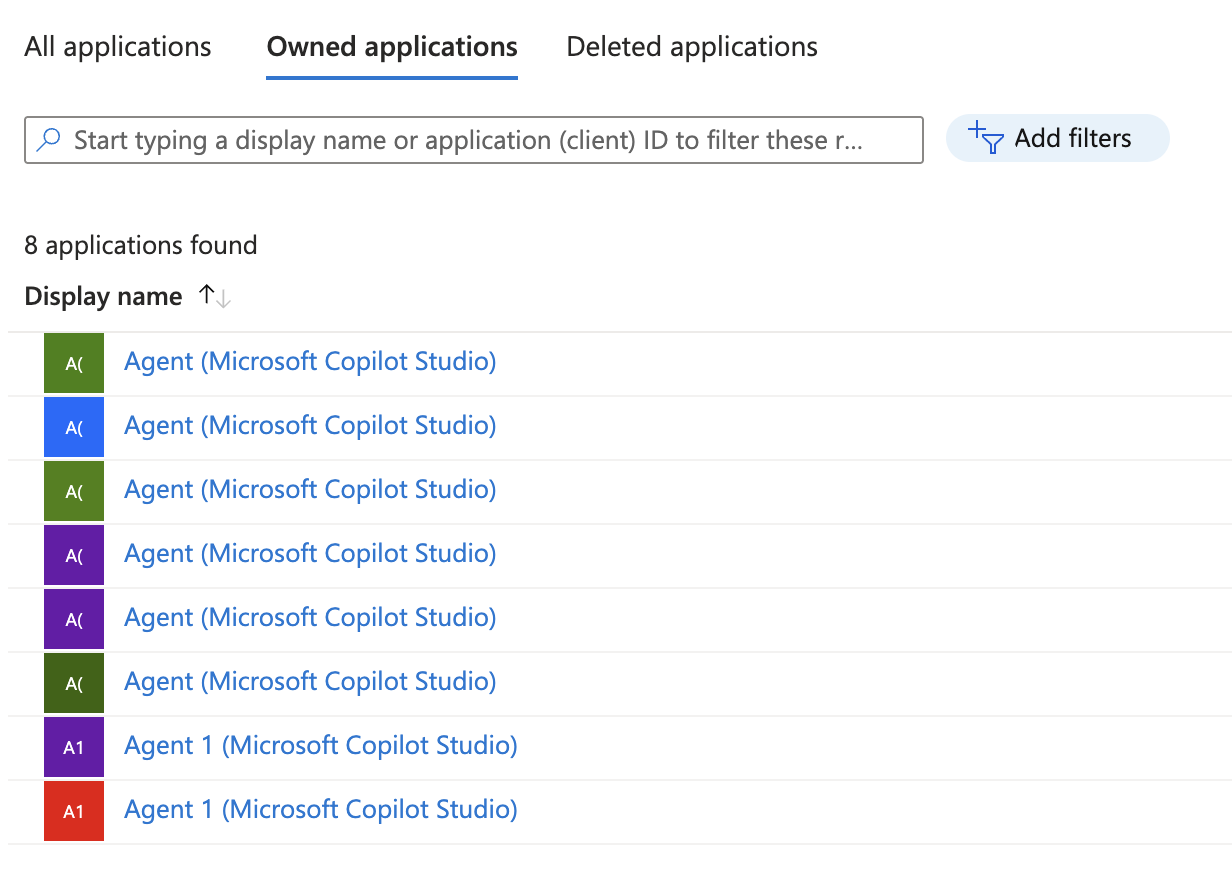
But there is an easy solution for this too.
Linking Agents to Their Entra Identity
When you query agents via the Dataverse Web API, the synchronizationstatus field contains the applicationId . This is the Entra ID App Registration Client ID:
curl -X GET "https://{your-org}.crm{region}.dynamics.com/api/data/v9.2/bots?\$select=botid,name,synchronizationstatus" \
    -H "Authorization: Bearer $DATAVERSE_TOKEN" \
    -H "Accept: application/json"
{
"value": [
{
"botid": "xxxxxxxx-xxxx-xxxx-xxxx-xxxxxxxxxxxx",
"name": "Agent - GitHub",
"synchronizationstatus": {
"currentSynchronizationState": {
"botRegistration": {
"applicationId": "xxxxxxxx-xxxx-xxxx-xxxx-xxxxxxxxxxxx",
"isAppAvailableInTenant": true
}
}
}
}
]
}Expand Options
The Dataverse API hides a lot of data by default. Use OData $expand to reveal more:
curl -X GET "https://{org}.crm{region}.dynamics.com/api/data/v9.2/bots(c8cda5e0-...)?\$expand=botcomponent_parent_bot,createdby,owninguser" \
    -H "Authorization: Bearer $DATAVERSE_TOKEN"
For example, the botcomponent_parent_bot expansion reveals all topics, actions, and tools configured for the agent - very useful!
Here’s a partial response where we can see default tools configured for an agent and also the Github - List all public repositories for a user tool which is more interesting of course.
{
	...
	"botid": "xxxxxxxx-xxxx-xxxx-xxxx-xxxxxxxxxxxx",
	"name": "Agent - GitHub",
	"createdon": "2025-12-29T12:43:16Z",
	...
	"botcomponent_parent_bot": [
		{
			...
			"_parentbotid_value": "xxxxxxxx-xxxx-xxxx-xxxx-xxxxxxxxxxxx",
			"modifiedon": "2025-12-29T12:43:26Z",
			"name": "Thank you",
			"description": "This topic triggers when the user says thank you.",
			...
		},
		{
			...
			"_parentbotid_value": "xxxxxxxx-xxxx-xxxx-xxxx-xxxxxxxxxxxx",
			"modifiedon": "2026-01-01T14:46:06Z",
			"name": "GitHub - Lists all public repositories for a user",
			...
		},
		...
	]
	...
}
Custom Tools and Knowledge Bases
Copilot Studio agents can connect to external services in several ways:
- Pre-built Connectors - ****GitHub, Salesforce, ServiceNow, etc.
- Custom Connectors - Your own API integrations
- Power Automate Flows - ****Complex automation workflows
- Knowledge Bases - ****SharePoint sites, uploaded documents, websites
Each of these represents a potential data flow that security teams should understand.
Listing Agents and Tools
1. Copilot Studio Agents (Dataverse Web API)
List all agents (as we’ve seen before):
curl -X GET "https://{your-org}.crm{region}.dynamics.com/api/data/v9.2/bots?\$select=botid,name,synchronizationstatus,authenticationmode" \
    -H "Authorization: Bearer $DATAVERSE_TOKEN" \
    -H "Accept: application/json"
Get agent components (tools, actions, topics):
curl -X GET "https://{org}.crm{region}.dynamics.com/api/data/v9.2/botcomponents?\$filter=_parentbotid_value eq 'c8cda5e0-...'&\$select=name,componenttype,content" \
    -H "Authorization: Bearer $DATAVERSE_TOKEN"
2. Copilot "Lite" Agents
In the Graph API, there was supposed to be an endpoint to collect a list of agents from your M365 copilot workspace, but it doesn’t really exist (the endpoint exists but cannot be accessed because it wasn’t developed by Microsoft for some reason): /beta/copilot/admin/catalog/packages
This paragraph is a summary of a few hours of me trying to figure out why my permissions were not enough - like Microsoft's HTTP response told me. Turns out Microsoft isn't planning to develop any public API to access "Lite" agents - which of course made me wonder why this endpoint exists other than to give me false hopes.
The workaround is to use Teams permissions.When creating an agent in the M365 Copilot dashboard, an app with the same name is created in the Teams service with a description indicating it was created by Copilot.
Use these Graph API permissions:
- User.Read.All
- TeamsAppInstallation.ReadForUser.All
Agents deployed to Teams show up as Teams apps. You can enumerate them via Graph API:
curl -X GET "https://graph.microsoft.com/v1.0/users/{user-id}/teamwork/installedApps?\$expand=teamsAppDefinition" \
    -H "Authorization: Bearer $GRAPH_TOKEN"
Aggregated across users, it looks like this:
{
  "teamsAppId": "xxxxxxxx-xxxx-xxxx-xxxx-xxxxxxxxxxxx",
  "displayName": "Agent - GitHub",
  "description": "Built using Microsoft Copilot Studio",
  "version": "1.0.0",
  "installedByUsers": [
    "Dan Abramov"
  ]
}
The description help us identify apps created by Microsoft Copilot.
Common Security Misconfigurations
Authentication Open to All
Agents can be configured to allow unauthenticated access.
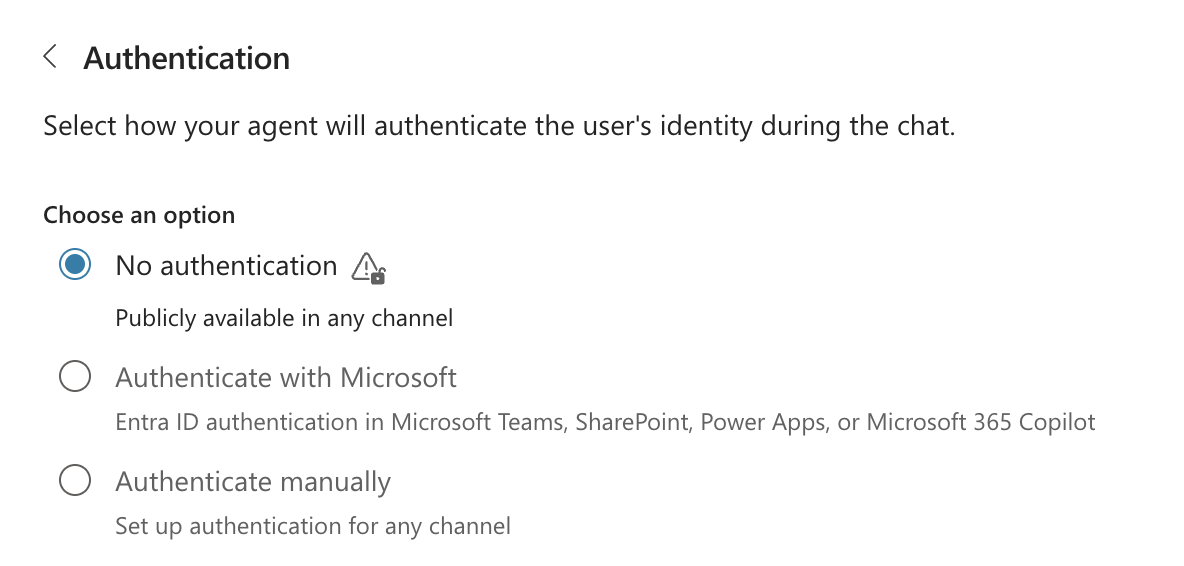
Make sure your agents can function without allowing unauthenticated access, it allows public availability to your agent and potentially to other exposed 3rd party apps via tools and custom actions.
Owner Credentials Instead of User Credentials
When OAuth connections use the owner's credentials, all users act as the agent creator. If the owner has elevated privileges, everyone inherits them.
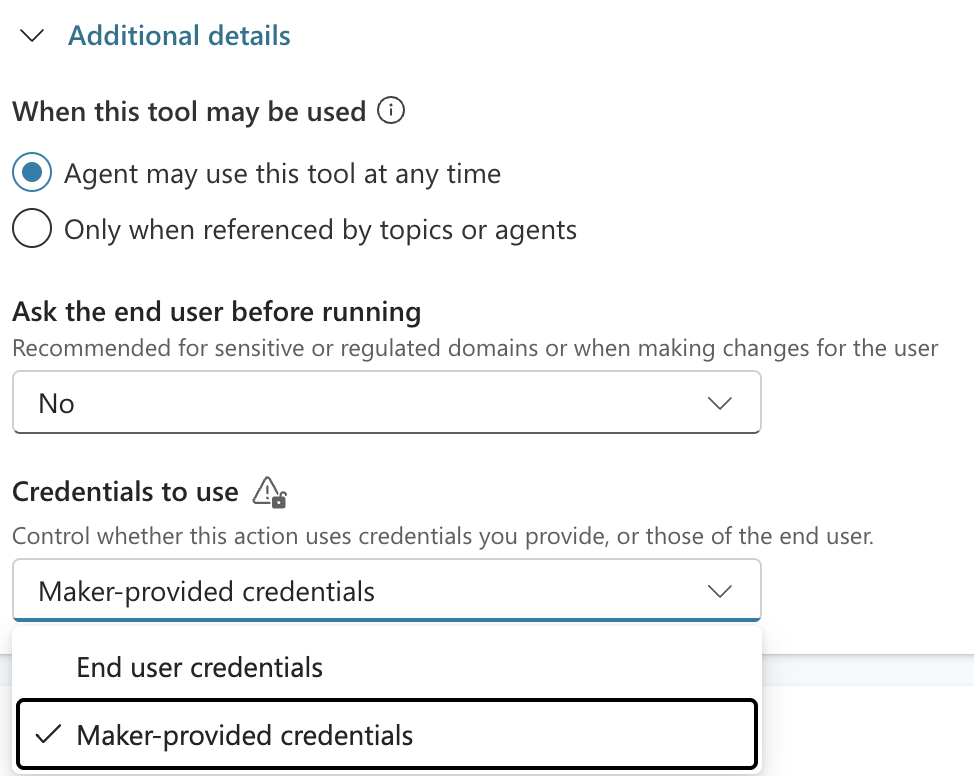
Microsoft warns from this configuration themselves. The use of the owner’s credentials delegates privileges in a rogue way, with less tools to monitor and investigate retrospectively.Try to avoid it, or at least make sure those aren’t high privileges to avoid creating shortcuts for bad guys.
Overprivileged 3rd Party Permissions
This is of course a very common security issue for agents. An overprivileged token / identity performing on behalf of the agent can potentially expose permissions to anyone who has access to the agent. Combining it with one of the other potential issues can be lethal. Make sure you only allow your agent’s identity the minimum it needs.
Logs
Your O365 Management API Audit.General logs have a few actions that reveal a lot of interesting information. Two of them are the CopilotInteraction and the PutConnection
CopilotInteraction
This action indicates sending a prompt, updating your agent and more. When sending a prompt, you have a few different attributes listed, one of which indicates the use of custom action and tools.Notice the AccessedResources field:
{
  "Operation": "CopilotInteraction",
  "UserId": "user@company.com",
  "Workload": "Copilot",
  "CopilotEventData": {
    "AccessedResources": [
      {
        "Action": "GetRepos",
        "Id": "/providers/Microsoft.PowerApps/apis/shared_github/...",
        "Name": "copilots_header_a7938.shared_github.GetRepos",
        "Type": "Connector"
      }
    ],
    "AppHost": "Copilot Studio"
  }
}
Imagine a futuristic world where agents can operate autonomously and perform actions in your environments freely. Now imagine a malicious actor getting access to one of those agents.
These logs can help investigate incidents involving Agents and help correlate agentic actions to your 3rd party platform logs, to know when an identity was used to act on behalf of an agent and what triggered it.
PutConnection
Captures when someone connects an agent to a 3rd party identity:
{
  "Operation": "PutConnection",
  "Workload": "PowerPlatform",
  "PropertyCollection": [
    {
    "Name": "powerplatform.analytics.resource.connector.name",
    "Value": "shared_github"
    },
    {
    "Name": "enduser.ip_address",
    "Value": "1.3.3.7"
    },
    {
    "Name": "user_agent.original",
    "Value": "Mozilla/5.0 (Macintosh; Intel Mac OS X 10_15_7) AppleWebKit/537.36 (KHTML, like Gecko) Chrome/143.0.0.0 Safari/537.36"
		},
    {
    "Name": "powerplatform.analytics.resource.connection.id",
    "Value": "CONNECTION_ID"},
    {
    "Name": "enduser.principal_name",
    "Value": "admin@company.com"}
  ]
}
This helps us indicate the moment of connection to the 3rd party app and get information about the connection, the identity used, the endpoint, etc.
The log describes a connection object created when a connection for a tool is established:We can see the type of connector being shared_github, and the ip address of the service establishing it.
We can also get information about the end use: the email address and the endpoint’s user agent.This is only a partial response by the way.
Summary
Microsoft can sometimes be confusing due to multiplication of services, APIs, and dashboards. Copilot is no exception, with multiple dashboards, different agent types and permission sets.(Open each of those and see what I mean: copilot.com, copilot.microsoft.com, m365.cloud.microsoft/chat, copilotstudio.microsoft.com)
As agents become more and more popular, they also become harder to govern. At Token Security we make sure all agents are covered across all LLM platforms, security flaws are detected and mitigation is just a click away.
This blog is a small guide to help you tell all Copilots apart and use a few tricks to monitor your Copilot agents a little better like we do in Token.
Talk to us to learn more, set up a meeting with Token Security.